Server:Server Status

Filibuster What?

Arlen Specter FTW.
Oh Snap

- - - - - - - - - - - - - - - - - - - - - - - - - - - - - - - - - - - - - - - - - - - - - - - - - - - - - - - - - - - - - - - - - - - - - - - - - - - - - - - - - - - - - - - - - - - - - - - - - - - - - - - - - - - -

CSS-Only Rounded, Shadowed, Transparent Corners

I've been super frustrated on a web project I've been on where I've wanted CSS-only (no slow-ass JSON solutions) rounded corners with transparent backgrounds and and drop shadows. I originally tried a 3 image solution with transparent backgrounds, but it didn't work well and the middle image showed up behind the top and bottom images. I tried just making the backgrounds of the png's match the css background, and I discovered the OSX Safari png gamma correction bug. I hate GIF's and JPEG's as much as I can avoid them, so I decided to just rewrite the solution from scratch, which isn't that hard.


The real reason I am writing this is because 90% of the time I want to do something online I just search for code to do something and use the first result as a template. It took me like 30 tries and I still found nothing decent, so I decided to just do it myself from scratch, and maybe someone else can use it.


This is a 9 image solution made in 3 horizontal sections: a header, a center block, and a footer. Yea, it's a ton of nested divs, but it validates, uses no overlap, works on all browsershots I have tested, and can be used with very small pngs. First of all, here's a sample of the result. Here's the images, their titles, and their dimensions, all of which can be modified:

  • Top Left Corner, 15px x 15px, tlc.png tlc
  • Top Border, 1px x 15px, tb.png tb
  • Top Right Corner, 15px x 15px, trc.png trc
  • Left Border, 15px x 1px, l.png l
  • Center, 1px x 1px, c.png c
  • Right Border, 15px x 1px, r.png r
  • Bottom Left Corner, 15px x 15px, blc.png blc
  • Bottom Border, 1px x 15px, bb.png bb
  • Bottom Right Corner, 15px x 15px, brc.png brc

The html for this box is as follows:

<!DOCTYPE html PUBLIC "-//W3C//DTD XHTML 1.0 Strict//EN" "http://www.w3.org/TR/xhtml1/DTD/xhtml1-strict.dtd">
<html xmlns="http://www.w3.org/1999/xhtml" xml:lang="en" lang="en">
 <head>
  <link rel="stylesheet" href="style.css" type="text/css" media="screen" title="no title" charset="utf-8"/>
 </head>
 <body>
  <div id="box">
   <div id="tlc"><div id="trc"><div id="tb"></div></div></div>
   <div id="lb"><div id="rb"><div id="c">
    <p>Holy Crap, content galore!</p>
   </div></div></div>
   <div id="blc"><div id="brc"><div id="bb"></div></div></div>
  </div>
 </body>
</html>

View the CSS for this technique here. Here's how this all breaks down in the box:
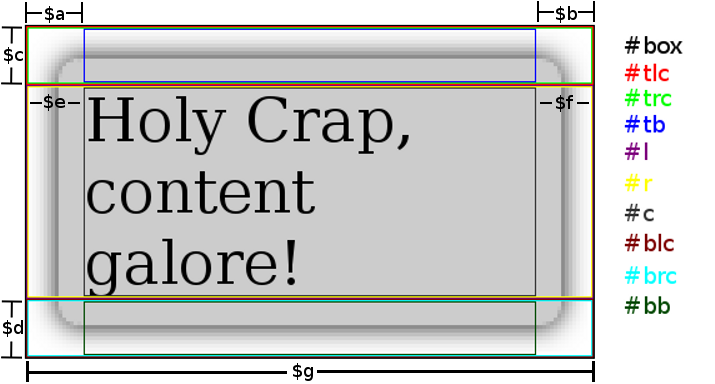

Breakdown

Here's the css required to make this happen, using the variables in the above image:

#box {
  text-align: left;
  position: relative;
  margin: 0 auto;
  padding: 0;
  width: $g;
}
#box #c {
  background: transparent url('c.png') repeat center center;
  margin: 0 $e 0 $f;
}
#box #tlc {
  height: $c;
  background: transparent url('tlc.png') no-repeat top left;
}
#box #trc {
  height: $c;
  background: transparent url('trc.png') no-repeat top right;
}
#box #blc {
  height: $d;
  background: transparent url('blc.png') no-repeat bottom left;
}
#box #brc {
  height: $d;
  background: transparent url('brc.png') no-repeat bottom right;
}
#box #tb {
  height: $c;
  margin: 0 $a 0 $b;
  background: transparent url('tb.png') repeat-x top center;
}
#box #bb {
  height: $d;
  margin: 0 $a 0 $b;
  background: transparent url('bb.png') repeat-x bottom center;
}
#box #rb {
  background: transparent url('r.png') repeat-y center right;
}
#box #lb {
  background: transparent url('l.png') repeat-y center left;
}
p {
  margin: 0 auto;
  padding: 0;
}

It should be very flexible; if you need to you can make the borders bigger or smaller, you can even use different widths for the bottom corners if you must. I thought about toying with another master-div that was on a higher z-index plane so your content could dip into the header/footer, but I decided against it because I don't have time. I hope this is useful, it shouldn't be so complicated but there were no decent guides online.

- - - - - - - - - - - - - - - - - - - - - - - - - - - - - - - - - - - - - - - - - - - - - - - - - - - - - - - - - - - - - - - - - - - - - - - - - - - - - - - - - - - - - - - - - - - - - - - - - - - - - - - - - - - -

Dropbox

Dropbox may be the greatest utility ever made. Dropbox, as far as I am concerned, completely obliterates the need for jump drives. It's cross platform, so it works on windows at work, linux at home (seriously, a utility that works natively on linux!) and mac for wherever. It's a folder on your computer that is automatically synched to a webspace, that is automatically synched to other computers I own. For example, if I have it installed at work, on my laptop, and on Jenn's laptop, I may write a cover letter for a job application at home one night, save it in dropbox, open it at work tomorrow (it's automatically updated) and edit it, save it, then e-mail Jenn and say "hey, can you look over this letter?" and she can just open it, correct it, save it, and it's done! No multiple versions, no losing jump drives, and if it's not installed on a computer, it has a web interface you can upload and download from. The free version gives you 2GB of storage. If I refer people to the service, I get an extra 250 MB of space, up to 3GB. I really recommend this service, and if you decide to try it out, click this link so I get the recommendation credit: https://www.getdropbox.com/referrals/NTE2OTYwOTk
- - - - - - - - - - - - - - - - - - - - - - - - - - - - - - - - - - - - - - - - - - - - - - - - - - - - - - - - - - - - - - - - - - - - - - - - - - - - - - - - - - - - - - - - - - - - - - - - - - - - - - - - - - - -

Solving the Rubiks Cube

GLOSSARY
    T=Top            B=Back           D=Bottom            L=Left            R=Right            F=Front   
    o=90 Degree Turn Clockwise          a=90 Degree Turn Counter-Clockwise        e=180 Degree Turn

  1. Make a Plus on Top with the color Opposite of White.
  2. Complete Top
    1. Figure out which cube goes in Top Front Right
    2. Move that cube to Bottom Front Right
      1. If Top Center matches Front of Bottom Right Corner Cube
        1. FoDoFa
      2. If Top Center matches Right of Bottom Right Corner Cube
        1. RaDaRo
      3. If Top Center matches Bottom of Bottom Right Corner Cube
        1. RaDoRoDe RaDaRo
      4. If no bottom face cube belongs on top
        1. RaDoRo
        2. Start at 2. 2. 1.
        3. Repeat until top is complete
    3. Repeat until Top is complete
  3. Turn the cube upside down
  4. Solve the Side Edges
    1. If the Block that needs to go in the Front Left Edge is found on the top
      1. Rotate the Top Side so that the desired Edge is in Front
      2. If the Top Side of the Top Front Edge matches the color of the Front Center Block
        1. FoTeRo Ta RaTeFa
      3. If the Top Side of the Top Front Edge matches the color of the Left Center Block
        1. Ta FoTeRo To RaTeFa
    2. If the Block that needs to go in the Front Left Edge is found on a side, move it to Front Left
      1. FoTeRoTo RaTeFa
      2. Return to Step 4. 1.
    3. Turn the cube to that the Block needed to be placed is in the Front Left Edge and repeat for all 4 sides
  5. Put the top corners in their correct position, ignoring if they are in the correct orientation
    1. If possible, rotate Top Side until correct
    2. If not possible but on the Top Side 2 opposing corners are correct
      1. Turn the Top Side so that the Top Back Left and the Top Front Right Corners are in their correct positions (this swaps the Top Back Right Corner and the Top Front Left Corner)
      2. ToFoToRoTaRaFa
    3. If not possible but on the Top Side 2 adjacent corners are correct (this swaps the Top Back 2 Corners)
      1. Turn the 2 correct adjacent corners on the Top Side to the Front in their correct position
      2. FoTaBaToFaTaBoTe
  6. Correct the Position of the Top Edges
    1. If all Top Edges are correct, move on to 7.
    2. If Opposing Top Edges need to be switched
      1. ReLeDoReLeTeReLeDoReLe
    3. If the Top Back Edge needs to be switched with the Top Right Edge AND the Top Front Edge needs to be switched with the Top left Edge
      1. RoBoToBaTaReFaTaFoToRo
    4. If the Top Back, Top Front, and Top Left need to be cycled Clockwise
      1. Orient the cube so that the Top Right Edge is in the correct Position
      2. LeTo FaBoLeFoBa ToLe
    5. If the Top Back, Top Front, and Top Left need to be cycled Counter-Clockwise
      1. Orient the cube so that the Top Right Edge is in the correct Position
      2. LeTa FaBoLeFoBa TaLe
  7. Orient the Top 4 Corners
    1. If they're oriented already, move on.
    2. If not, make the Front edge of the Front Top Right block White
      1. RaDoRoFoDoFa
      2. Turn Top Side so another Top Corner that is out of place in the Top Front Right
      3. FoDaFaRaDaRo
      4. For any other top corners out of place, repeat 7. 2.
  8. Correct Top Edge Orientation
    1. Either 2 or 4 Top Edge Blocks will need correction
    2. Start with an Edge needing correction in the Top Front position
      1. FoToDaLeTeDeRo
      2. Turn the Top Side so that any Top Edge needing correction is in the Top Right position
      3. RaDeTeLeDoTaFa
      4. If 2 Top Edge Blocks remain to be corrected, repeat 8. 2.
  9. Turn Top Edge to complete Cube

- - - - - - - - - - - - - - - - - - - - - - - - - - - - - - - - - - - - - - - - - - - - - - - - - - - - - - - - - - - - - - - - - - - - - - - - - - - - - - - - - - - - - - - - - - - - - - - - - - - - - - - - - - - -

Replacing Nautilus with pcmanfm in ubuntu intrepid

I love ubuntu, but lately I've come to hate Nautilus. It's a nice program, but it's so bloated that it takes 5+ minutes to open my music folder which has 4000 files in it. Lame.

PCmanFM works well, and is extremely fast. Nevertheless, GNOME depends heavily on Nautilus so it's tricky to get rid of. Also, I use dropbox, which relies on Nautilus, unless you use heavy modifications.

Follow these steps to replace nautilus with pcmanfm. I'm assuming you have nautilus installed, and already have Dropbox.
http://ubuntuforums.org/showpost.php?p=4441760&postcount=2
Then

  1. Uninstall Dropbox
  2. rmdir --ignore-fail-on-non-empty any directory beginning with ~/.dropbox
  3. Uninstall Nautilus
  4. Download this: https://dl.getdropbox.com/u/43645/dbcli.py to home
  5. Make sure python is installed
  6. sudo chmod 755 dbcli.py
  7. Reboot
  8. ./dbcli.py install x86
  9. Add "/home/surfrock66/Scripts/dbcli.py status" to your session startup
- - - - - - - - - - - - - - - - - - - - - - - - - - - - - - - - - - - - - - - - - - - - - - - - - - - - - - - - - - - - - - - - - - - - - - - - - - - - - - - - - - - - - - - - - - - - - - - - - - - - - - - - - - - -